10 Gaming Room Ideas That’ll Level Up Your Home Instantly

A great gaming room is about more than powerful hardware. The right layout, lighting, furniture, and accessories can completely change how your space looks and feels. Whether you enjoy competitive online matches, story-driven adventures, or casual gaming after work, a well-designed room helps you stay comfortable while making every session more enjoyable.
The best gaming room ideas combine style with function. A clean setup reduces distractions, smart lighting creates the right atmosphere, and ergonomic furniture keeps you comfortable during long hours. Even small upgrades can make a noticeable difference without requiring a complete renovation.
This guide shares practical gaming room ideas that work for large game rooms, small bedrooms, apartments, and dedicated gaming spaces. Every suggestion focuses on improving comfort, organization, and visual appeal while creating a room you’ll enjoy spending time in.
1. Command Center Lighting That Actually Slaps

Lighting sets the mood before you even switch on your PC or console. Instead of relying on one bright ceiling light, combine multiple light sources to create depth and atmosphere throughout the room.
RGB LED strips behind your monitor, under your desk, or around shelves produce a soft glow that reduces eye strain while making your setup look modern. Smart bulbs allow you to change colors depending on the game you’re playing, while warm white lighting works well for everyday use.
Avoid placing bright lights directly behind your monitor, as they can create unwanted reflections. Instead, focus on indirect lighting that spreads evenly across the room.
A balanced lighting setup also makes your gaming room look better in photos, videos, and live streams.
Build Your Glow
Start with one primary light source and gradually add accent lighting instead of filling every corner with LEDs.
Good lighting combinations include:
- RGB LED strips behind monitors
- Smart floor lamps
- Backlit wall panels
- LED light bars
- Desk lamps with adjustable brightness
- Floating shelf lighting
The goal is to create layers of light rather than overwhelming the room with intense colors.
2. The Desk Setup That Means Business
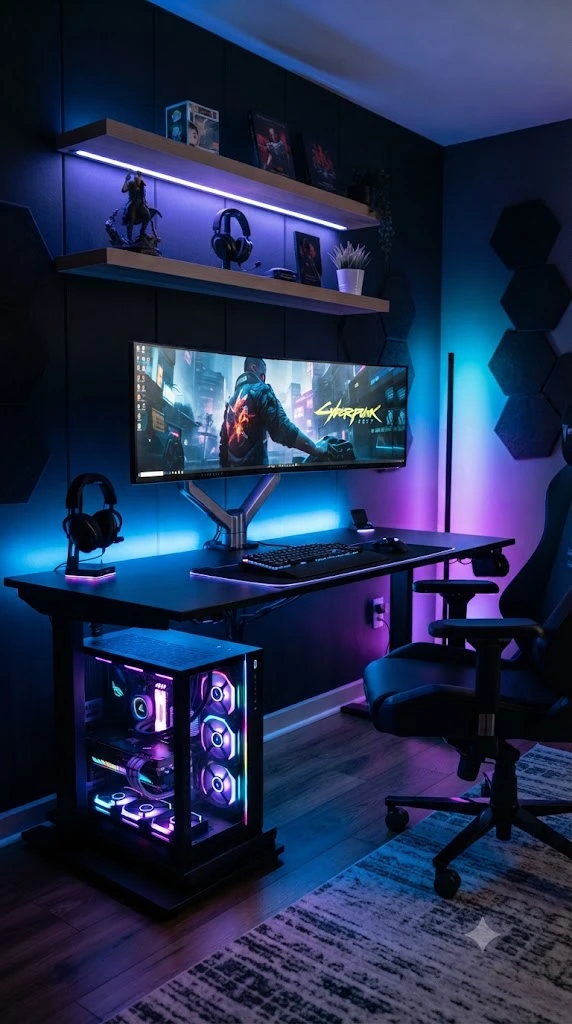
Your desk is the centerpiece of your gaming room. It supports your monitors, keyboard, mouse, speakers, and accessories, making it one of the most important investments in your setup.
Choose a desk with enough surface area to keep everything organized without feeling crowded. A wider desk allows comfortable monitor placement while leaving space for writing, streaming equipment, or additional displays.
Cable management is equally important. Hidden cables instantly make the room feel cleaner and more professional.
Consider adding:
- Monitor arms
- Under-desk cable trays
- Wireless charging pads
- Headphone hooks
- USB hubs
- Drawer organizers
These small additions improve both appearance and daily convenience.
What to Look For
When choosing a gaming desk, prioritize quality over unnecessary features.
Look for:
- Strong steel frame
- Spacious desktop
- Scratch-resistant finish
- Built-in cable management
- Adjustable monitor placement
- Stable construction with minimal wobble
If your room is compact, an L-shaped corner desk can maximize usable space without making the room feel crowded.
3. Seating You Can Actually Sit In For Hours

No gaming room feels complete without a chair that supports your body properly. While racing-style gaming chairs are popular, comfort should always come before appearance.
An ergonomic chair with adjustable lumbar support, headrest, reclining function, and quality cushioning helps reduce fatigue during long gaming sessions.
If you spend several hours at your desk every day, investing in a comfortable chair is one of the smartest improvements you can make.
The correct seating position also improves posture, helping reduce strain on your neck, shoulders, and lower back.
Pair your chair with a footrest if your feet don’t comfortably reach the floor.
Comfort Checklist
Before buying a gaming chair, check for these features:
- Adjustable armrests
- Lumbar support
- Breathable fabric or mesh
- High-density foam
- Adjustable seat height
- Reclining backrest
- Durable wheels
- Strong weight capacity
Comfort should always match your body size and daily gaming habits rather than following current trends.
4. Sound That Goes Boom (Without Being A Bad Neighbor)\
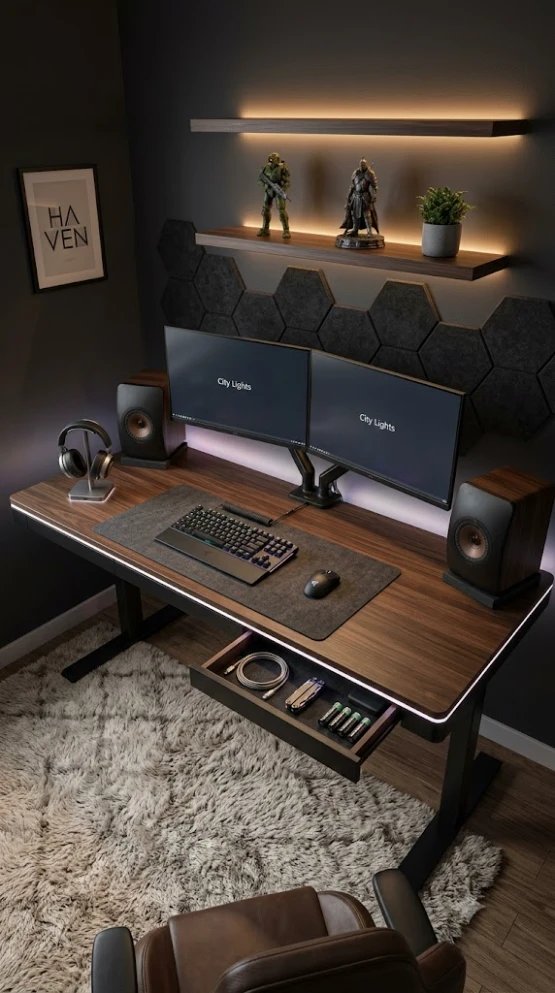
A great gaming experience is not only about what you see on the screen. Clear, balanced audio helps you react faster, enjoy immersive stories, and communicate better with teammates. The goal is to create rich sound without disturbing everyone else in the house.
Start by deciding how you usually play. If you game late at night or live in an apartment, a quality gaming headset is often the best option. It delivers detailed sound while keeping noise to yourself. If you have a dedicated gaming room, compact bookshelf speakers or a soundbar can provide a wider soundstage for single-player games and movies.
Room acoustics also matter. Hard surfaces reflect sound, creating echoes that make audio less enjoyable. Adding curtains, rugs, acoustic foam panels, or fabric wall art helps absorb excess noise while improving the room’s appearance.
Keep speaker placement balanced. Position left and right speakers at ear level when possible, and avoid placing them directly against walls where bass can become overwhelming.
Smart Sound Setup
Creating a balanced audio setup doesn’t require expensive equipment. A few thoughtful upgrades can significantly improve your experience.
A practical gaming audio setup includes:
- High-quality gaming headset for competitive games
- Compact speakers for everyday entertainment
- Adjustable microphone for clear communication
- Acoustic wall panels to reduce echo
- Soft rugs and curtains for natural sound absorption
- Cable organizers to keep everything neat
The result is a cleaner gaming space with immersive sound that feels powerful without becoming overwhelming.
5. Wall Style: Go Bold Or Go Subtle, But Make It You

The walls in your gaming room are a perfect opportunity to show your personality. Whether you prefer a clean minimalist look or a bold gaming theme, thoughtful wall decor makes the space feel complete without creating visual clutter.
Large framed artwork, floating shelves, LED wall panels, and subtle geometric patterns can add depth while keeping the room organized. Instead of covering every wall with posters, choose a few statement pieces that complement your furniture and lighting.
Dark wall colors often create a dramatic gaming atmosphere, while lighter shades make smaller rooms appear larger and brighter. If repainting isn’t an option, removable wall decals or peel-and-stick wallpaper offer an easy alternative.
Balance is important. Too many decorations can distract from your gaming setup, while a few carefully selected pieces create a polished appearance.
Easy Wins
Simple wall upgrades can completely refresh your gaming room without spending a fortune.
Consider adding:
- Floating shelves for collectibles
- Framed gaming artwork
- Hexagon LED wall lights
- Minimalist wall clocks
- Acoustic decorative panels
- Metal gaming signs
- Indoor wall-mounted plants for contrast
Choose colors and textures that match your desk, chair, and lighting for a cohesive look.
6. Storage That Looks Clean (Even When You’re Not)

A clutter-free gaming room feels larger, looks more professional, and makes it easier to focus on playing. Good storage solutions keep accessories within reach while hiding the items you don’t use every day.
Start by identifying what needs permanent storage. Controllers, charging cables, headphones, games, streaming gear, and cleaning supplies should each have a dedicated place.
Closed cabinets hide visual clutter, while open shelves work well for displaying collectibles, books, or gaming memorabilia. Under-desk drawers and rolling storage carts are excellent choices for smaller rooms where space is limited.
Cable management is another essential part of storage. A few cable sleeves and clips can instantly transform a messy setup into a clean workspace.
Storage Strategy
Organize your room based on how often you use each item.
Daily essentials:
- Controllers
- Keyboard
- Mouse
- Headset
- Chargers
Weekly items:
- Extra accessories
- Camera equipment
- Game cases
- Cleaning supplies
Display items:
- Collectibles
- Awards
- Figures
- Decorative lighting
Keeping everything in its proper place makes cleaning faster and helps your gaming room maintain a polished appearance.
7. Theme It (Lightly) For Maximum Impact

A themed gaming room doesn’t need to feel like an arcade. Small design choices can create a consistent atmosphere without making the space look overly busy.
Choose one overall style and let every element support it. Modern minimalist, cyberpunk, industrial, sci-fi, retro gaming, or black-and-white setups all work well when the colors, furniture, and accessories complement each other.
Avoid mixing too many themes in one room. A consistent color palette creates a more premium look while making future upgrades easier.
Textures also play an important role. Wood surfaces add warmth, matte black furniture creates contrast, and soft fabrics balance the lighting throughout the room.
Choose A Vibe
Popular gaming room styles include:
- Modern minimalist
- Cyberpunk RGB
- Industrial loft
- Black and white luxury
- Retro arcade
- Sci-fi inspired
- Natural wood and greenery
- Monochrome setup
Choose a theme that matches your personality and your available space rather than following short-term design trends.
8. Stream-Ready Backdrop Without the Chaos

If you create gaming content or join regular voice and video chats, your background becomes part of your setup. A clean, well-designed backdrop looks professional and helps keep the focus on you instead of random clutter.
You don’t need an expensive studio to achieve this. A simple wall with floating shelves, tasteful décor, soft lighting, and a few collectibles can create a polished appearance. Keep the background balanced by avoiding too many bright colors or oversized decorations.
Lighting is equally important. Position a soft key light in front of you and use subtle ambient lighting behind you to add depth. This creates a more flattering look while reducing harsh shadows.
Hide anything that doesn’t belong on camera. Loose cables, stacked boxes, and unused equipment can quickly make the space look untidy.
Backdrop Basics
A professional streaming background should include:
- Floating shelves with a few collectibles
- Soft ambient LED lighting
- Neutral or dark wall colors
- Small indoor plants for contrast
- Framed artwork or gaming-inspired prints
- Hidden cable management
- A clean desk with minimal accessories
A simple and organized backdrop often looks far better than one filled with too many decorations.
9. Comfort Layers: Textiles, Plants, and Break Zones

Comfort goes beyond your chair. The little details throughout your gaming room can make long sessions more enjoyable while giving the space a warm, welcoming feel.
Start with soft textures. A plush rug helps reduce noise and makes the room feel cozier. Blackout curtains improve the gaming experience by controlling glare while also adding a finished look.
Plants are another excellent addition. They introduce natural color and soften the appearance of electronics and furniture. Low-maintenance plants like snake plants, pothos, or ZZ plants work well in gaming spaces.
If your room allows, create a small relaxation corner. A bean bag, lounge chair, or reading nook provides a place to take short breaks without leaving the room.
Layer the Cozy
Simple additions that improve comfort include:
- Soft area rug
- Blackout curtains
- Throw blanket
- Decorative cushions
- Indoor plants
- Small side table
- Cozy reading chair
- Warm accent lighting
These finishing touches make your gaming room feel less like a workspace and more like a space you’ll genuinely enjoy spending time in.
10. Performance Touches That Make Everything Smoother

A beautiful gaming room should also perform well. Small technical improvements can make everyday gaming more convenient while keeping your setup running efficiently.
Proper ventilation is essential, especially for high-performance gaming PCs. Leave enough space around your computer for airflow and regularly clean dust from fans and filters.
Internet stability is another key factor. Whenever possible, use a wired Ethernet connection instead of relying only on Wi-Fi for lower latency and more consistent performance.
Power management also deserves attention. A quality surge protector or UPS helps protect your equipment from unexpected power interruptions while keeping cables organized.
Regular cleaning and maintenance help preserve both performance and appearance.
Pro Tips
Improve your gaming room with these practical upgrades:
- Use an Ethernet connection for stable online gaming
- Keep PC vents free from dust
- Install a surge protector
- Maintain proper airflow around electronics
- Clean your desk every week
- Organize cables with reusable ties
- Update peripherals when needed
- Use monitor arms to free up desk space
Small improvements made consistently often have a greater impact than expensive upgrades.
Quick Room Layout Ideas
The layout of your gaming room depends on its size, but keeping movement easy and your equipment accessible should always be the priority.
| Room Size | Recommended Layout |
|---|---|
| Small Bedroom | Corner desk with floating shelves |
| Medium Room | Straight desk with storage cabinet |
| Large Room | Dedicated gaming zone and relaxation corner |
| Studio Apartment | Multi-purpose desk with vertical storage |
| Content Creator Setup | Dual desk layout with streaming background |
Image Prompt
Top-down interior visualization of multiple gaming room layouts including small bedroom setup, medium gaming room, large gaming studio, corner desk arrangement, modern furniture placement, realistic architectural render, highly detailed, 16:9 horizontal image.
Mini Shopping List (Optional, But Handy)
If you’re planning a gaming room makeover, these essentials provide the biggest improvement:
- Ergonomic gaming chair
- Spacious gaming desk
- Monitor arms
- Mechanical keyboard
- Large desk mat
- RGB LED light strips
- Cable management kit
- Floating shelves
- Headphone stand
- Indoor plants
- Blackout curtains
- Surge protector
- Quality gaming headset
Focus on buying durable, high-quality items that fit your space instead of filling the room with unnecessary accessories.
Final Styling Tips
The best gaming room ideas focus on balance rather than excess. A clean layout, comfortable furniture, thoughtful lighting, and organized storage create a space that feels both functional and visually impressive.
Choose a consistent color palette, keep decorations intentional, and leave enough open space for the room to breathe. Regular cleaning, hidden cables, and subtle personal touches will keep your setup looking fresh over time.
Remember that your gaming room should reflect your personality while supporting the way you play. Whether you’re competing online, streaming content, or simply relaxing with your favorite games, a well-designed space makes every session more enjoyable.
Conclusion
Creating an impressive gaming room doesn’t require unlimited space or an enormous budget. By combining smart lighting, ergonomic furniture, organized storage, quality sound, and a consistent design theme, you can build a setup that looks incredible and feels comfortable every day.
The best gaming room ideas are the ones that fit your lifestyle. Start with the essentials, upgrade gradually, and focus on practical improvements that enhance both performance and comfort. With thoughtful planning and attention to detail, your gaming room can become one of the most enjoyable spaces in your home.